Please note that this product includes: Cubieboard:Standard Edition|Package A|Package C??
Customers can according to their needs, in the classification of the purchase of the corresponding version!Specific version of the configuration refer to different versions of the configuration list
Product Introduction
Cubieboard Raspberry Pi is a similar development board, but it's processor cores to Cortex-A8, more powerful.
Resource Introduction
Allwinner A10 core featuresCPUARM Cortex-A832KB I-Cache32KB D-Cache256KB L2 CacheGPUARM Mali-400VideoUHD 2160P video decoding3D video decodingSupport various video decoding formats, including VP8, AVS, H. 264 MVC, VC-1, MPEG-1,2,4, etcH.264 HP video encoding up to 1080p 30 fps or dual-channel 720p 30 fpsDisplayMulti-channel HD displayIntegrated HDMI 1.4YPbPr, CVBS, VGAMultiple LCD interfaces, including CPU, RGB, LVDS up to Full HDMemory32-bit DDR2 / DDR3 Memory capacity up to 16G bitsSLC / MLC / TLC / DDR NAND
- 8 flash chips, 64-bit ECC
- Memory capacity up to 64GB
- Support NAND of 5xnm, 4xnm, 3xnm, 2xnm, etc
- Support NAND of Samsung, Toshiba, Hynix, etc
Boot DevicesNAND FlashSPI NOR FlashSD CardUSB
Cubieboard featuresProcessorAllwinner A10Board resources1GB DDR3 480MHz x1HDMI connector x1100M card x14Gb Nand Flash x1USB Host x2micro Slot x1Sata x1Ir x1OtherExtended Interface: 96Pin, support I2C, SPI interfaces driver; can support LCD, sensors and other equipmentSystem: Android, Ubuntu or other version linux, factory-installed Android 4.0
Product Image
![Cubieboard]()
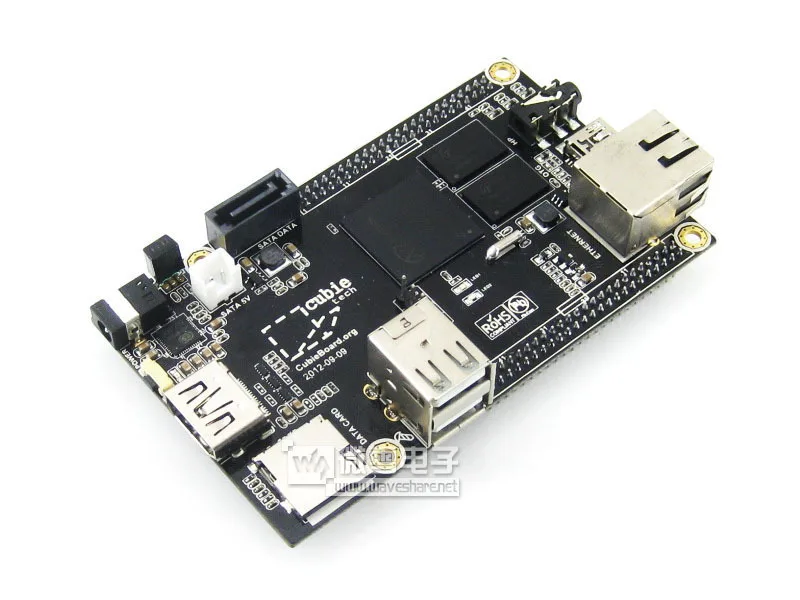
Cubieboard positive side view
![Cubieboard]()
Cubieboard back side view
![Cubieboard]()
Cubieboard front view
![Cubieboard]()
Cubieboard use diagram
![Cubieboard]()
Cubieboard function analysis in Figure 1
![Cubieboard]()
Cubieboard function analysis in Figure 2be especially wary:
?? This product does not include a schematic of the module, fittings, if necessary, please purchase separately.This resource expansion board
![CPLD FPGA EPM1270]() [Core Interface Overview]CUBIEBOARD1 / 2 interfaces
[Core Interface Overview]CUBIEBOARD1 / 2 interfacesEasy access to CUBIEBOARD1 / 2
CUBIEBOARD1 / 2 Expansion InterfaceUser-friendly expansion IO
TVOUT InterfaceConvenient CVBS video output, you can connect the TV and other equipment
VGA InterfaceConvenient VGA output can be connected to monitors and other equipment
7inch capacitive screen RGB interface7inch capacitive screen for easy access to the RGB interface
7inch capacitive screen LVDS Interface7inch capacitive screen for easy access to LVDS interface
7inch resistance screen RGB interface7inch resistive touch screen for easy access to the RGB interface
CAMERA InterfaceEasy access OV7670 camera module, etc.
ZIGBEE InterfaceEasy access to the Company's core board Core2530, and supporting the use of the ZB501
UART interfaceEasy access to all kinds of use UART interface module,
Such as RS485 Board (3.3V), GPS module
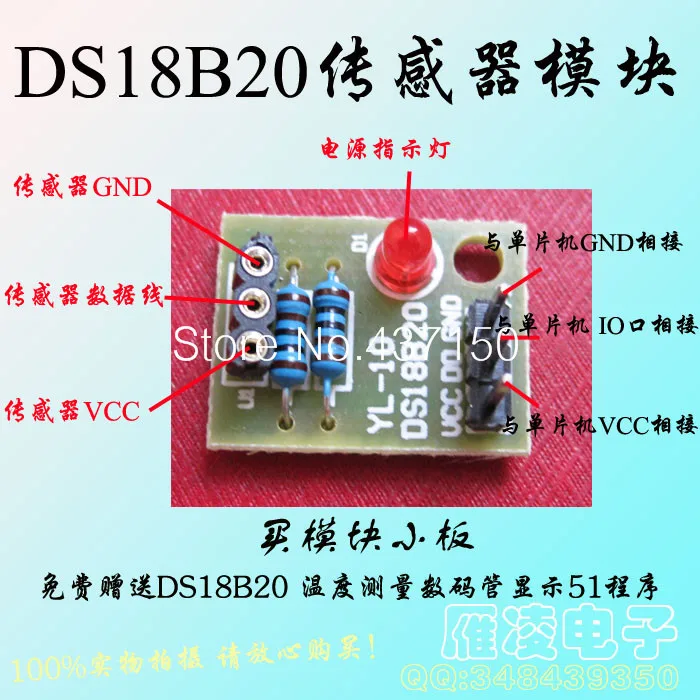
ONEWIRE InterfaceEasy access to all kinds of ONEWIRE interface devices (TO-92 package),
Such as temperature sensors DS18B20 etc.
SPI0 / I2C1 InterfaceEasy access to all kinds of use SPI or I2C interface module,
As MAG3110 Board, AT45DBXX Dataflash module
Arduino InterfaceEasy access to Arduino compatible module
UART interface (PL2303TA)Easy to connect with UART0 Interface CUBIEBOARD1 / 2, the debugger
USB InterfaceUSB TO UART (PL2303TA)
ICSP InterfaceThe ICSP interface Arduino
5V / 3.3V power supply input and output interfacesCommonly used in the external power supply, or with the user board to handle a total of
[Device Overview]12M crystalPL2303TA using crystals
PL2303TAUSB TO UART chip
RTC backup battery3.3V Battery
32.768KHZ CrystalPCF8563 using crystals
PCF8563RTC real time clock chip
BuzzerAD button3 ANDROID commonly used keys:
VOL +, VOL-, ESC
User LED8 User LED
Power LED[Jumper Description]TVOUT Select JumperCAMERA power select jumperRTC use select jumperRTC power select jumperONEWIRE, buzzer and AD keys using selection jumperArduino Port select jumperWhen access to a host of other Arduino, can optionally be connected.
Select the user LED jumperArduino AD select jumperJump to the right side: connect Arduino ADC peripherals
Jump to the left: access Arduino I2C peripherals
Arduino UART JumperJump to the right side: connect Arduino UART peripherals
Jump to the left: access Arduino Host
Expansion board illustration
![]()
DVK522 side view
![]()
DVK522 side view of the back
![]()
DVK522 front view
![]()
Access Cubieboard
![]()
Access Cubieboard side view
![]()
Access Cubieboard and peripheral modules
![]()
Access 7 inch capacitive screen
![]()
Access 7 inch capacitive screen display
Detailed configuration:Standard EditionCubieboard x1Cubieboard Sata cable x1Take x1 USB cable1![]() 2
2![]() 3
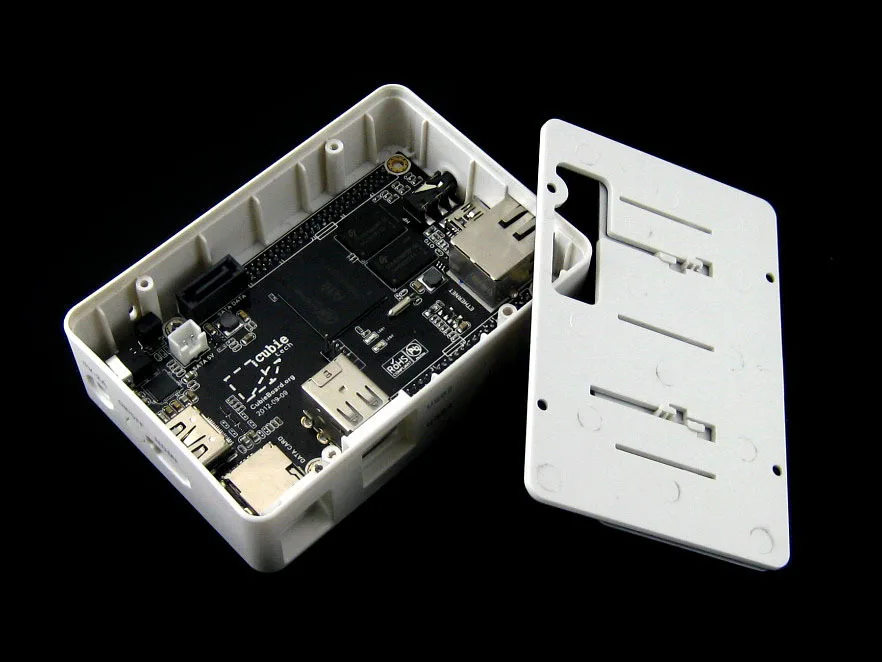
3![]() Package ACubieboard x1Cubieboard housing A type x1Cubieboard Sata cable x1Take x1 USB cableUSB to TTL 4PIN Dupont line (built-in chip) x11
Package ACubieboard x1Cubieboard housing A type x1Cubieboard Sata cable x1Take x1 USB cableUSB to TTL 4PIN Dupont line (built-in chip) x11![]() 2
2![]() 3
3![]() 4
4![]() 5
5![]()
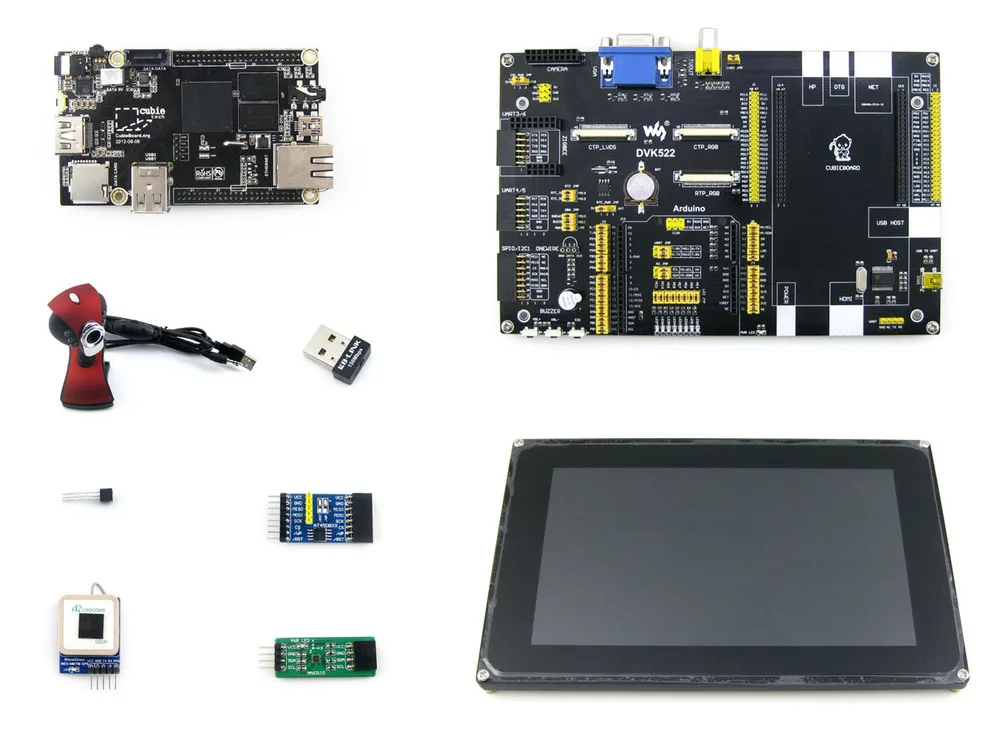
Package CCubieboard x1DVK522 x17inch Capacitive Touch LCD (D) x1AT45DBXX DataFlash Board x1MAG3110 Board x1DS18B20 x1UART GPS x1USB WIFI BL-150UM RTL8188 x1USB Camera OV7670 x1Cubieboard Sata cable x1Take x1 USB cableUS regulatory power 5V 2A outer diameter of the inner diameter of 2.1 × 1 5.5Power adapter 5.5 / 2.1mm revolution 4.0 / 1.7mm x14PIN + 2PIN cable package x1USB cable type A male port switch mini-B male port x1Direct Connect network cable 1.5M x1FFC cable 40PIN-0.5 200mm (in the same direction) x17-inch LCD pillars package x11![]() 2
2![]() 3
3![]() 4
4![]() 5
5![]() 6
6![]() 7
7![]() 8
8![]() 9
9![]() 10
10![]() 11
11![]() 12
12![]() 13
13![]() 14
14![]() 15
15![]() 16
16![]() 17
17![]() 18
18![]()







 2
2 3
3 Package ACubieboard x1Cubieboard housing A type x1Cubieboard Sata cable x1Take x1 USB cableUSB to TTL 4PIN Dupont line (built-in chip) x11
 3
3
 3
3 4
4 5
5 6
6 7
7 8
8 9
9 10
10 13
13 14
14 15
15 16
16 17
17 18
18

Я купил себе несколько таких футболок - и покупкой могу быть доволен! Они, в принципе, хорошего качества, жаловаться не на... Читать отзыв полностью...